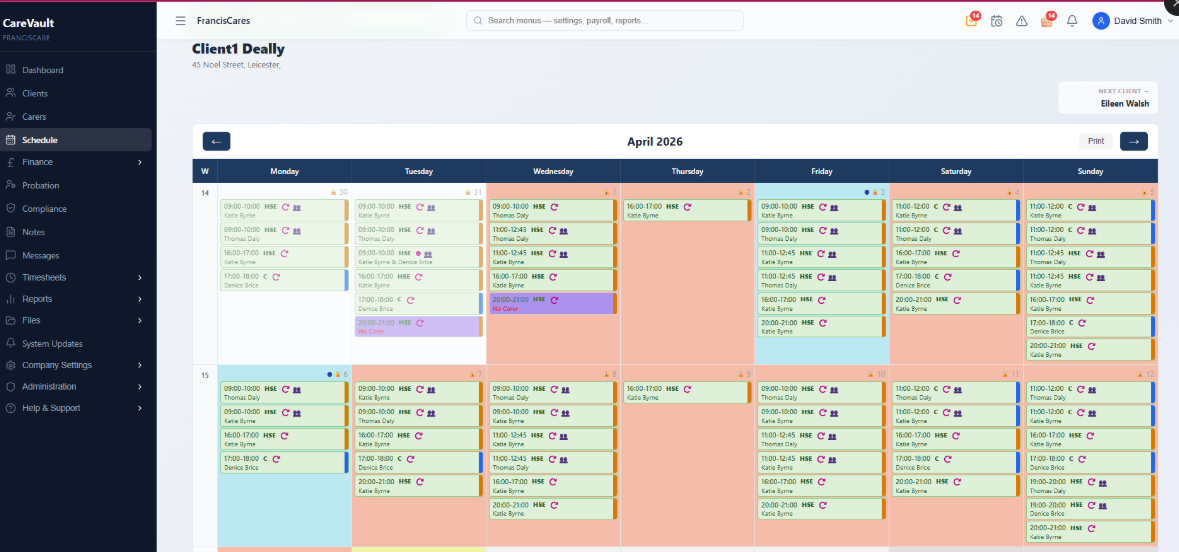
The CareVaultc scheduling calendar — visual weekly view with colour-coded visits
Visual Weekly Calendar (Mon-Sun)
CareVaultc's scheduling view is built around the client, not the carer. Select a client and see their entire week laid out Monday to Sunday. Every visit is colour-coded by status: grey for draft, blue for published, green for confirmed, and red for cancelled.
Each event block shows the assigned carer's name, visit time, and job type at a glance. Coordinators can scan a full week of care in seconds without clicking into individual events.
Click any empty day slot to create a new visit. The calendar is designed for speed — the coordinators who build rotas for 80+ clients every week told us what they needed, and this is it.
One-Touch Recurring Runs
Most home care clients receive the same visits every week. CareVaultc lets you create a full week of recurring visits with one action. Set the carer, start and end time, days of the week, and job type — then generate every event in a single click.
Need to change one occurrence? Edit it individually without breaking the rest of the series. The recurring run is a template, not a rigid lock — real care schedules need that flexibility.
When a carer goes on leave, swap them out across the entire run. No need to edit seven individual events. One action, one confirmation, done.
Intelligent Suggest Carer
The Suggest Carer button finds the best available carer for any visit based on three criteria: no time conflict with existing visits, match against the client's preferred carer list, and geographic proximity.
This saves coordinators minutes per event. Across a week of 200+ visits, those minutes become hours. The suggestion is instant — one click, one result, accept or override.
The algorithm checks the carer's existing schedule, leave records, and availability settings before making a recommendation. No more phoning carers to ask if they are free.
Real-Time Conflict Detection
Assign a carer to a visit and CareVaultc instantly checks for conflicts. If the carer is already booked for an overlapping time, on leave that day, or marked as unavailable, a conflict badge appears directly on the calendar event.
Conflict badges are visible without clicking into the event. Coordinators can spot double-bookings at a glance while building the rota, not after it has been published to carers.
The system checks against published events, draft events, and leave records simultaneously. No more phone calls to check availability — the data is already there.
Preferred Carer Matching
Continuity of care is a core expectation from both HIQA and CQC. Clients benefit from seeing the same carers, and regulators expect agencies to demonstrate they prioritise continuity.
CareVaultc lets you tag preferred carers against each client profile. When a non-preferred carer is assigned to a visit, the system flags it so coordinators can make an informed decision rather than an accidental one.
The preferred carer list feeds directly into the Suggest Carer algorithm, ensuring that the system recommends the right carers first and only falls back to others when preferred carers are genuinely unavailable.
Draft & Publish Workflow
Build the entire week's rota without carers seeing incomplete or tentative schedules. All new events start as drafts — visible only to office staff. Carers see nothing in their mobile app until you publish.
When the rota is ready, one-click bulk publish pushes the entire week to the carer app. No more partial schedules causing confusion, no more carers arriving at the wrong time because they saw an intermediate version.
Need to make changes after publishing? Unpublish individual events or entire days, make adjustments, and republish. The workflow gives coordinators control without sacrificing visibility.
Irish & UK Bank Holidays
All Irish and UK public holidays are hardcoded into CareVaultc's scheduling engine. Weekend and bank holiday visits are automatically flagged for premium rate calculation — no manual tagging required.
When payroll runs, the system already knows which visits occurred on bank holidays and applies the correct pay rate. This eliminates the single biggest source of payroll errors in home care: miscategorised holiday visits.